> For the complete documentation index, see [llms.txt](https://docs.nftbutler.io/nft-butler/llms.txt). Markdown versions of documentation pages are available by appending `.md` to page URLs; this page is available as [Markdown](https://docs.nftbutler.io/nft-butler/setup/export-wif-for-btc-wallet-import.md).

# Export WIF for BTC Wallet import

{% hint style="info" %}
[How to add a BTC Wallet to Butler](/nft-butler/nft-butler/getting-started/add-bitcoin-wallet-ordinals.md)
{% endhint %}

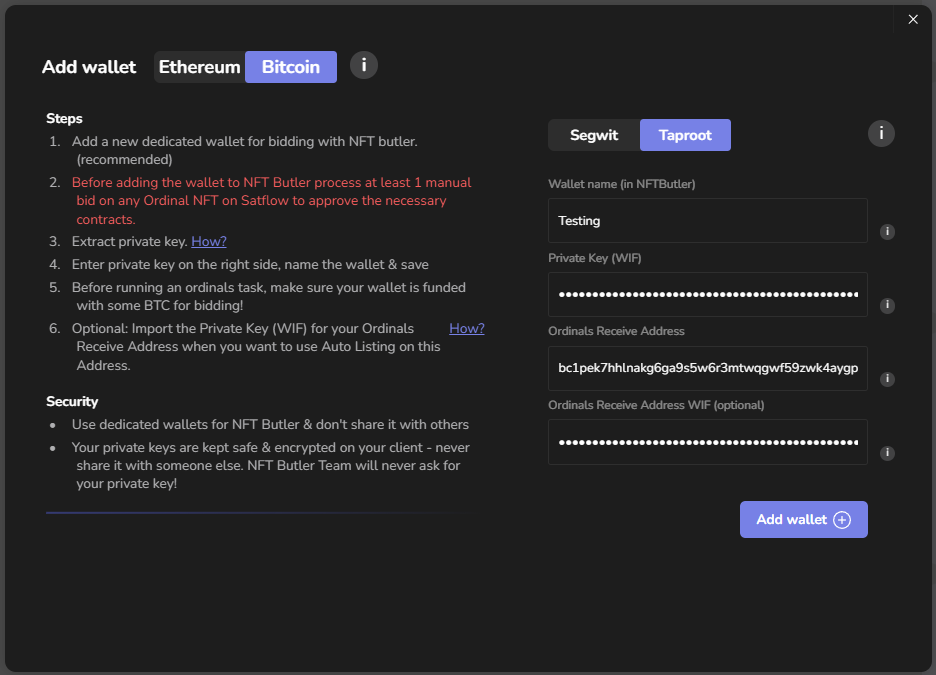
This can be done when adding a new Wallet to Butler or when checking Details of an existing Wallet:

<div align="center"><figure><img src="/files/d28japIqbr07QvH0eM9V" alt=""><figcaption><p>Adding new Wallet.</p></figcaption></figure> <figure><img src="/files/Q8XzPcpKJNqiEdT4rD32" alt=""><figcaption><p>Adding Ordinals Receive Addr WIF on existing BTC Wallet</p></figcaption></figure></div>

## Exporting Private Key from Unisat Account

Your Unisat wallet will allow to export your private key from the Account list in the required format (WIF Private Key):

<div><figure><img src="/files/8sYSMI6D28wYaqpOJ1ce" alt=""><figcaption><p>Clicking on my main Account</p></figcaption></figure> <figure><img src="/files/cYsfiZXQI3Dkes3MUSRe" alt=""><figcaption><p>Then opening settings on Account 1</p></figcaption></figure> <figure><img src="/files/7pw8MR9C0oJYJq5tlTjQ" alt=""><figcaption><p>Hit "Export Private Key" to export it</p></figcaption></figure></div>

Then enter your Unisat Password to confirm the export:

<div><figure><img src="/files/t50tN4p5pBmlay3ldyx7" alt=""><figcaption><p>Enter Unisat app password</p></figcaption></figure> <figure><img src="/files/xfCn5ghhO0IIWDxI4W6e" alt=""><figcaption><p>Copy the WIF Private Key and add it to the matching Wallet in Butler.</p></figcaption></figure></div>

{% hint style="info" %}
Only use the exported Private Key to import it to Butler. It will be stored strongly encrypted on your local computer only.

No one from the NFT Butler Team will ever ask for your BTC Private Key / WIF in Discord or anywhere else. Never share it with anyone in chat!
{% endhint %}

The exported Private Key (WIF) can be [imported ](#importing-magiceden-wallet-seed-to-unisat)to the right BTC Wallet in Butler with the matching Taproot (Ordinals Receive) Address.

## Importing MagicEden wallet seed to Unisat

1. First you need to save your seed phrase from MagicEden Wallet -> Security Settings to your local Secret Store (best to store seed and passwords in a keystore like [KeePass](https://keepass.info/)).
2. Next move to your Unisat Account Overview and add a New Account from there:

<div><figure><img src="/files/HXNePKda8PBrVEMjHfZl" alt=""><figcaption><p>Go back to the Account Overview</p></figcaption></figure> <figure><img src="/files/moW6ZgNe0le63HeCX05q" alt=""><figcaption><p>Add a new Account</p></figcaption></figure></div>

3. From here we can import the previously exported seed phrase as 12 word mnemonic seed:

<div><figure><img src="/files/YCw3EYJ3VievCEBTF8f8" alt=""><figcaption><p>Restore from mnemonics seed phrase</p></figcaption></figure> <figure><img src="/files/o0OFsa0VSRwCv5VubdkI" alt=""><figcaption><p>Use "Other Wallet" here...</p></figcaption></figure></div>

4. Next step is to import your seed phrase by typing the 12 words in the correct order here:

<figure><img src="/files/dgTdUg0nD21Wqu8TOX8t" alt=""><figcaption><p>Import 12 word Magic Eden Wallet seed</p></figcaption></figure>

Now on this next step you'll have to specify which MagicEden Wallet Account you want to import as new Account on Unisat. See the below listto check the right paths for each ME Account:

<figure><img src="/files/4Pu8P86JE04kFZh2yR1u" alt=""><figcaption><p>Importing ME Wallet Account2 here</p></figcaption></figure>

{% hint style="info" %}
Import Derivation Path for each ME Wallet Account:

* Account 1: `m/86'/0'/0'/0`
* Account 2: `m/86'/0'/1'/0`
* Account 3: `m/86'/0'/2'/0`
* Account 4: `m/86'/0'/3'/0`
* Account 5: `m/86'/0'/4'/0`
* Account 6: `m/86'/0'/5'/0`
* Account 7: `m/86'/0'/6'/0`
* Account 8: `m/86'/0'/7'/0`
* Account 9: `m/86'/0'/8'/0`
* Account 10: `m/86'/0'/9'/0`
  {% endhint %}
